Ever miss a Slack mention and only find out after the meeting? Watch Outlook bury a client email under a hundred low-priority ones? Lose an Asana task alert because it arrived in yet another app? You are not alone. Whether you live in Slack, Outlook or Asana, it is easy to lose critical updates. Everything pings, but nothing stands out. That is notification overload.
The problem: everything pings, nothing stands out
Each tool was built to grab your attention on its own terms. Put three or four of them together and the urgent stuff competes with the trivial stuff for the same red badge. The result is a fractured mental model: you are technically notified about everything, and reliably aware of nothing.
Why you miss messages (without realising it)
1. Slack notification gaps. Slack is built around direct messages, mentions and keyword alerts, but the settings break easily: silent or paused threads, Do Not Disturb and system-level blocks, or relying on keyword alerts that simply do not catch everything. So important pings slip by unnoticed.
2. Outlook and email complexity. Too many folders and labels, alerts disabled outside business hours, and notification settings buried in submenus mean even high-priority email can vanish into the noise.
3. Asana and task alerts. Asana sends task assignments and comment alerts, but if you miss one while jumping between apps, it is gone from your radar. Diverse tools plus diffuse alerts equals a fractured picture of what actually needs you.

The fix: a unified notification hub
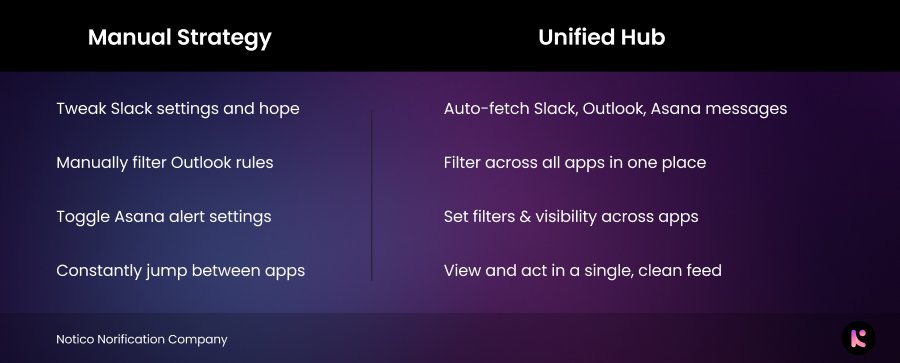
Imagine one dashboard that pulls in your Slack mentions, Outlook emails and Asana task updates, all in real time, with smart filters for priority and customisable escalation, like reminders for unread high-priority items. That is a unified notification hub, and it solves the root cause instead of patching one app at a time.
Try it yourself
Before reaching for any tool, tighten what you have:
- In Slack: set a notification schedule, enable keyword alerts, and pause your noisiest channels.
- In Outlook and Asana: review your notification emails and alert workflows so the important ones actually reach you.
The real win, though, is testing a tool that centralises everything, so you stop missing what is important in the first place.
End the chaos of scattered alerts, from one clean dashboard
Notico's unified notification hub already supports Slack, Outlook and Asana, with Gmail and smarter filters coming soon. Join early access, see everything in one place, and help shape the features with real feedback.
Join the waitlist, free early accessFeeling overwhelmed by notifications is not your fault, it is a system problem. The right fix can change how you work every day.